Nice work by Brij Mohan on MVC 4 cheat sheet
jQuery team released jQuery 1.10.2 and 2.0.3 on July 3, 2013. These releases fix a few pesky bugs that have been reported over the past month, but the list is refreshingly small. Since some of the bugs spanned both the 1.x and 2.x branches we’re releasing new versions of both to keep them in sync
You can get the latest files from the jQuery download page, including sourcemap files and links to helpful tools such as jQuery Migrate. If you’re upgrading from a version of jQuery before 1.9, please do read through that page carefully to make your migration as pain-free as possible. Remember that it may take a few days for the CDNs at Google, Microsoft, and CDNJS to respond to the rocket’s red glare and post the latest versions. In the meantime, use the copy on the jQuery CDN.
jQuery 1.8.1 is released on 30th Aug, 2012. This version fixes the issues reported by the community following the final release of 1.8.0. Here are the files, ready for you to use:
The Google and Microsoft CDNs will also have copies available soon.
The final set of bugs that were fixed are listed below. Don’t forget, folks, we love to hear about bugs in the betas and release candidates too! You don’t have to wait for a final release to test with your code. The earlier we can fix these bugs, the smoother things go for both the team and the jQuery community.
Use jQuery UI 1.8.23 and jQuery Mobile 1.1.1 or later for best compatibility with jQuery core 1.8.1.
jQuery 1.8.0 is released by jQuery on 09-Aug-2012 by jQuery team.
Sizzle re-architected: jQuery’s selector engine is faster than ever, thanks to a rewrite (well, reallytwo rewrites) by Timmy Willison. Sure, most browsers have querySelectorAll nowadays, but nearly every implementation falls short in one way or another, creating a road full of cross-browser potholes. Sizzle smoothes that road for you. Plus, you may want those useful jQuery selector extensions like :has() with a complex selector or :contains(). Oh yeah, and there’s still IE6/7 support.
Animations re-imagined: Over time, the animation code in jQuery had become kind of messy. Corey Frang took a head-first dive into that swamp and managed to remove most of the alligators, um, bugs. Most of the changes are under the covers, so existing animations should just work (and work better). But there are also some awesome additions to make animations more general and extendable. One notable and very cool feature is the use of the progress callbacks in Promises. We’re still working on detailed documentation, but we do have a draft. Also, here’s an example of the new code in action: http://jsbin.com/odocid/1/edit.
Automatic CSS prefixing: When you use a CSS property, in either .css() or .animate(), we’ll use the correct prefixed property (when appropriate) for that browser. For example, take.css("user-select", "none"); in Chrome/Safari we’ll set the value as "-webkit-user-select", Firefox will use "-moz-user-select", and IE10 will use "-ms-user-select".
More flexibility with $(html, props): In jQuery 1.8, you can use any jQuery method or plugin in the object passed to $(html, props). Before, you could only use a short list of method names, and there was no documented way to add to the list. Now there doesn’t need to be a list at all! Be aware, however, that this can cause the behavior of your code to change if plugins are added later that have the same names as HTML attributes.
More than 160 bugs closed: The Sizzle and animation rewrites in particular provided the impetus to fix several long-standing bugs–some of which have been around for two or three years. Mike Sherov tackled most of the open CSS and positioning issues, getting us down to near-zero bugs there. We also haven’t given up and are still pounding away to eliminate annoying differences between IE 6/7/8 and modern browsers, so you don’t have to deal with them.
Smaller code size: Despite all the code cleanup, new features, and bug fixes, the gzipped file size of jQuery 1.8 is actually a few hundred bytes smaller than jQuery 1.7.2. Size reduction wasn’t our primary goal in this version, but we felt it was important to hold the line on code growth, and we definitely achieved that. Many thanks to Richard Gibson for leading the code-crunching charge across the entire project.
Modularity: If you know your project’s jQuery dependencies well, you can use the new grunt-based build system to strip out parts of jQuery that you know you don’t need. What we’ve done here for 1.8 is really just a beginning, you’ll see even more flexibility as we move to later versions.
Microsoft released SQL Server 2012 on 02-Apr-2012. Those wanting to get their hand on the bits can follow this link. However, it leads to an evaluation copy of SQL Server 2012, which is good for six months
Microsoft changed the product editions with this release. Enterprise edition is now the top-of-the-line product that comes with "unlimited" virtualization rights. The BI edition is a new product for organizations interested in using Microsoft's business intelligence improvements in SQL Server 2012. Finally, Microsoft offers a Standard edition.
On top of the evaluation edition, Microsoft offers a free SQL Sever 2012 Express edition for lightweight use, which can be downloaded here.
jQuery 1.6.2 is now out! This is the second minor release on top of jQuery 1.6 and lands a number of fixes for bugs.
As usual, two copies of jQuery, one minified and one uncompressed (for debugging or reading).
jQuery 1.5.2 is released on 31-Mar-2011. This is the second minor release on top of jQuery 1.5 and lands a number of fixes for bugs.
As usual, we provide two copies of jQuery, one minified and one uncompressed (for debugging or reading).
You can feel free to include the above URLs directly into your site and you will get the full performance benefits of a quickly-loading jQuery.
Additionally you can also load the URLs directly from Microsoft and Google’s CDNs:
Microsoft CDN: http://ajax.aspnetcdn.com/ajax/jQuery/jquery-1.5.2.min.js
Microsoft published Visual Studio 2010 Service Pack 1 Beta on 03-Dec-2010. To download click here.
The fourth minor release of jQuery 1.4 is now available — less than one month after 1.4.3 was released.
Unsurprisingly, version 1.4.4 is primarily a set of bug fixes following feedback from the user community. There is only one new feature…
The .fadeToggle() method provides fade-in and fade-out animation. If an element is visible, it’s opacity is reduced and, when it reaches zero, the display property is set to none so the element disappears from the page layout.
Calling .fadeToggle() on an invisible element (where display:none is set) makes the item visible and fades it back in.
If you’ve been struggling to make your code work, you’ll be pleased to know that the following issues have been fixed:
Grab jQuery 1.4.4 from:


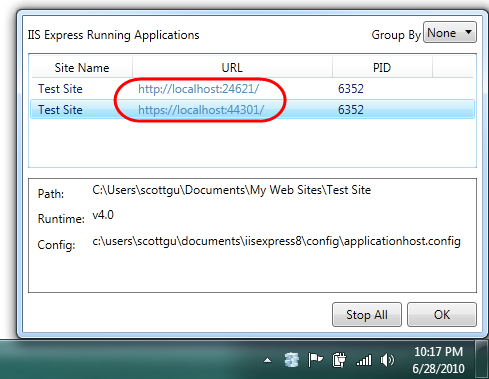
IIS Developer Express: A lightweight web-server that is simple to setup, free, works with all versions of Windows, and is compatible with the full IIS 7.5.
SQL Server Compact Edition: A lightweight file-based database that is simple to setup, free, can be embedded within your ASP.NET applications, supports low-cost hosting environments, and enables databases to be optionally migrated to SQL Server.
ASP.NET “Razor”: A new view-engine option for ASP.NET that enables a code-focused templating syntax optimized around HTML generation. You can use “Razor” to easily embed VB or C# within HTML. It’s syntax is easy to write, simple to learn, and works with any text editor.
Microsoft introduces a new lightweight web development tool that also integrates the above technologies, and makes it even easier for people to get started with web development using ASP.NET. This tool is free, provides core coding and database support, integrates with an open source web application gallery, and includes support to easily publish/deploy sites and applications to web hosting providers.
Microsoft calling this new tool WebMatrix, and the first preview beta of it is now available for download.
What is in WebMatrix?
WebMatrix is a 15MB download (50MB if you don’t have .NET 4 installed) and is quick to install.
The 15MB download includes a lightweight development tool, IIS Express, SQL Compact Edition, and a set of ASP.NET extensions that enable you to build standalone ASP.NET Pages using the new Razor syntax, as well as a set of easy to use database and HTML helpers for performing common web-tasks. WebMatrix can be installed side-by-side with Visual Studio 2010 and Visual Web Developer 2010 Express.
Note: Razor support within ASP.NET MVC applications is not included in this first beta of WebMatrix – it will instead show up later this month in a separate ASP.NET MVC Preview - which will also include Visual Studio tooling support for it.
For more information please visit http://weblogs.asp.net/scottgu/archive/2010/07/06/introducing-webmatrix.aspx
Scott Guthrie did a blog post that covers a very small, but still useful, feature of VS 2010 – the ability to “pin” projects and solutions to both the Windows 7 taskbar as well VS 2010 Start Page.
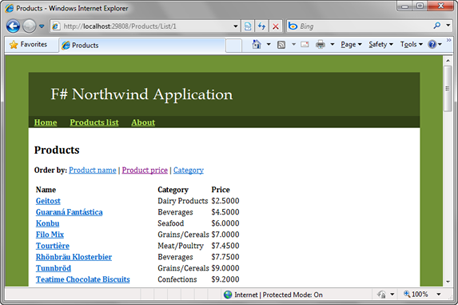
Here is the nice blog by Tomas Petricek on developing MVC web applications in F# using ASP.NET. http://tomasp.net/blog/fsharp-mvc-web.aspx
The first maintenance release for jQuery UI 1.8 is out. This update brings a bunch of fixes to Autocomplete and a few fixes to other plugins. For the full list of changes, see the changelog. You can download it here:
Please visit http://tinyurl.com/37jqqfx for an excellent article by Amirthalingam Prasanna on developing data access layer with ADO.NET entity framework 4.0
Quickly interpret your code: The new code editor makes it easy to zoom in on your code, highlight method references, and overlay powerful features.
Create rich user experiences: Use new visual designers for Windows Presentation Foundation and Silverlight™ to target Windows® 7 and the Web.
Customize Visual Studio to fit your style: Key IDE enhancements–including support for multiple monitors and improved readability–that make the familiar environment even more productive.
Use your existing skills: SharePoint development, including tooling for Web Parts, Lists, Workflows, Events and more, bring great new customized collaboration tools to your company.
MSDN subscriptions: With Visual Studio 2010 MSDN subscriptions, you have access to specified servers and clients for development and test purposes, in addition to all the other MSDN subscription benefits such as support resources, Windows® Azure™ compute hours, learning tools, and high quality information resources.
Database Development Made Easy (Premium): Apply the same life-cycle tools to your database code and your application code. This includes offline development of database schema, use of source code control to persist versioned schema information, participation in Agile methodologies and use of the associated work items.
Identify Test Impact from Code Changes (Premium): Test Impact Analysis provides a list of recommended tests to run after code changes are made. Developers know immediately which tests are impacted by a given change and testers know which tests to run to verify a given build.
Understand Existing Architectures (Ultimate): The Architecture Explorer and UML sequence diagrams help you explore and understand your existing code assets and their inter-dependencies.
IntelliTrace™ Eliminates ‘No Repro’ (Ultimate): Easily step through code that was previously executed on the same or another machine in order to identify what happened during the code execution and significantly cut down on time spent reproducing a bug.
Prototype Ideas Quickly (Ultimate): With Sketch Flow in Expression Studio you can quickly deliver a functioning prototype that looks and feels like handwritten mock-ups.
1 - Generating Sequence Diagrams To Inspect And Document control flow
Another cool feature in Visual Studio 2010 is the ability to generate Sequence diagrams. You may right click inside a method and select “Generate the sequence diagram” from the pop up menu, to generate the diagram. In this example, you may see that my SubmitOrder method in OrderViewModel class is instantiating an OrderServiceClient, to call AddOrderAsync method inside the same.
2 - Architecture Explorer
A cool addition in VS2010 is the Architecture Explorer (Click View->Architecture Explorer). The Architecture Explorer will provide you a very friendly interface to browse through and navigate to your solution assets. You can right click on an item (Namespace, Class Name, or Class Member etc) and select ‘View Content’ to navigate to the definition as well.
Also, you can export the selected items to a graph document from the Architecture explorer. You can do this by selecting the members, and clicking the ‘Create new graph document’ button (in top left corner) of the Architecture Explorer. Let me export some of the members in my OrderViewModel class, and have a look at the generated graph. You can also use the graph document to understand your code members in a better way, to analyze circular references, un referenced nodes etc (see the image below.)
3 – Code Navigators
Visual Studio 2010 has a number of useful code navigators. A simple yet useful code navigation/identification feature is ‘Highlight Reference’ - you can double click on any member to view the references highlighted, and can navigate across references using the Ctrl + Shift + Up/Down arrows.
Another cool code navigator is the ‘Navigate To’ window. You can use ‘Navigate To’ to search code members quickly when you work with the editor.
You can bring up the “Navigate To” window using the shortcut Ctrl , (press Ctrl and comma). You can search by any term, and you can even search using camel case. See that I’m searching for ‘OV’, to get a list of all code members following the OV convention.
Another cool code navigation feature in Visual Studio 2010 is the ‘Call Hierarchy’ window. You may right click any member to bring up the popup menu, to select ‘Find All References’ to bring up the call hierarchy window. So, next time when you change a method, you can have a look at where all you are going to impact. You can also view all overrides of your method, if you have any.
4 – Pinning Data Tips While Debugging
When you are debugging, you can pin variable values, so that they’ll be there for you to see later.
Also, you can even enter comments for a pinned data tip, so that you can view the comment later.
VS 2010 has also got a tone of other Debugger Enhancements, read about them from Scott Gu’s blog if you are interested.
5 - Consume First Development
Visual Studio is so smart that it can stub your classes, members etc on the go, when you type the code. For example, assume that you have a customer class, and you thought it should have a new method while doing something. You can just type the member name (method, property etc), rest your mouse on top of the tiny blue line under your new method to bring up the popup menu.
Click that, and you’ll see VS stubbing the method for you, as shown below. Note that VS has inferred the parameter type.
You can do that with constructors, properties, method overloads etc as well. That is super cool, especially if you are a TDD guy.
6 – Extension Manager for downloading and installing plugins
The Extension Manager in Visual Studio 2010 will allow you to download and install cool plug-ins for your VS IDE. You can bring up the extension manager window by clicking Tools->Extension Manager. Extension Manager will connect to Visual Studio 2010 online Extension library, and you can search and find cool plug-ins there.
Once installed, you may also Disable or Uninstall your plug-ins from the extensions manager.
Scott Guthrie did a blog post that talks about a bunch of small, but really nice, new VS 2010 debugger features: Click here to view.