Developers today build and test ASP.NET sites and applications using one of two web-servers:
- The ASP.NET Development Server that comes built-into Visual Studio
- The IIS Web Server that comes built-into Windows
Both of the above options have their pros and cons, and many ASP.NET developers have told us: “I wish I could have the ease of use of the ASP.NET Development Server, but still have all the power and features of IIS”. Today I’m happy to announce a new, free option that we are enabling – IIS Express - that combines the best characteristics of both, and which will make it easier to build and run ASP.NET sites and applications.
IIS Express will work with VS 2010 and Visual Web Developer 2010 Express, will run on Windows XP and higher systems, does not require an administrator account, and does not require any code changes to use. You will be able to take advantage of it with all types of ASP.NET applications, and it enables you to develop using a full IIS 7.x feature-set.
How Things Work Today
Before I get into the details of IIS Express, let’s first quickly review how the ASP.NET Development Server and IIS options work today.
ASP.NET Development Server
Visual Studio’s built-in ASP.NET Development Server (also known as “Cassini”) has the benefit of being light-weight and easy to quickly run. It doesn’t listen on remote ports (which makes it easier to get approved for many corporate security environments), works even when you are running under a non-administrator account, and doesn’t require a separate installation step.
The fact that it is so easy to get running is a huge positive of it – and the reason it is the default web-server used by ASP.NET projects in Visual Studio when you press F5 to run them:

The downside with the ASP.NET Developer Server, though, is that it does not support a full set of web-server features. For example, it doesn’t support SSL, URL Rewriting Rules (like the
SEO URL Rewrite Rules I blogged about
here), Custom Security Settings, and other richer features now offered with IIS 7.
IIS Web Server
IIS is the other option developers use when running and testing their applications with Visual Studio. You can configure a web project within Visual Studio to use IIS by right-clicking on the project and pulling up its properties (and then by clicking on the “Web” tab within the properties window)":

Using IIS as your development server allows you to take full advantage of all web-server features (SSL, URL Rewrite Rules, etc). IIS is a full-fledged web-server – which means you’ll get an experience closer to what it will work like when you deploy the application on a production server.
The downside with using the IIS option today, though, is that some companies don’t allow full web-servers to be installed on developer machines. IIS also requires administrator account access to setup and debug projects. Different versions of Windows also support different versions of IIS. For example, if you are running on Windows XP you have to use the IIS 5.1 web-server that comes with it – which doesn’t support all the new features of IIS 7.x. Configuring a web project within VS to use IIS also requires some extra installation and configuration steps.
IIS Express – The Best of Both Options
We have been working on a new flavor of IIS 7.x that is optimized for developer scenarios that we are calling “IIS Express”. We think it combines the ease of use of the ASP.NET Web Server with the full power of IIS. Specifically:
It’s lightweight and easy to install (less than 10Mb download and a super quick install)
It does not require an administrator account to run/debug applications from Visual Studio
It enables a full web-server feature set – including SSL, URL Rewrite, Media Support, and all other IIS 7.x modules
It supports and enables the same extensibility model and web.config file settings that IIS 7.x support
It can be installed side-by-side with the full IIS web server as well as the ASP.NET Development Server (they do not conflict at all)
It works on Windows XP and higher operating systems – giving you a full IIS 7.x developer feature-set on all OS platforms
IIS Express (like the ASP.NET Development Server) can be quickly launched to run a site from a directory on disk. It does not require any registration/configuration steps. This makes it really easy to launch and run for development scenarios.
VS 2010 Integration
We are enabling IIS Express so that it can be easily used with Visual Studio 2010. You’ll be able to configure VS 2010 to use it instead of the ASP.NET Web Server as the default web-server on ASP.NET Projects. Like the ASP.NET Development Server today, you won’t need to register a site or virtual directory to use IIS Express. It will support the same usage-model as the ASP.NET Development Server today – just with more feature support.
When you press F5 to run an ASP.NET project, Visual Studio can automatically launch IIS Express and use it to run/debug the application (no extra configuration required). Like the ASP.NET Web Server, IIS Express will show up in your task-bar tray when running:

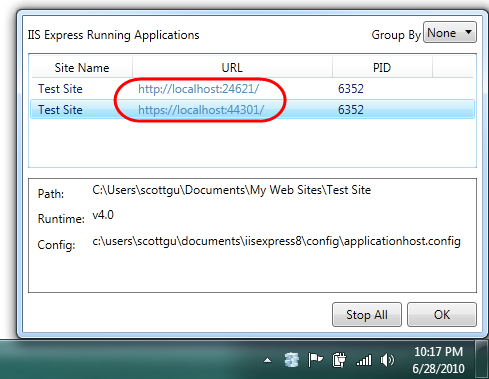
You can right-click and click “exit” on the icon above to quickly shutdown IIS Express. You can also right-click and pull up a list of all sites running with it, as well as the directory location and .NET versions they are running under:

Two cool things to notice above:
1) The “Test Site” we are running, as well as IIS Express itself, live under the c:\users\[username] folder on disk. This enables non-administrator usage of IIS Express and sites – and enables a bunch of scenarios not possible with the full IIS today (including the ability to run IIS Express in both a locked-down enterprise environment as well as a locked-down school shared computer environment).
2) The “Test Site” we are running above using IIS Express supports both HTTP and HTTPS access. IIS Express automatically installs a “self-signed certificate” and enables URL ACLs and SSL Certificates for ports so that developers (running as non-administrators on a machine) can use SSL without needing to elevate their accounts or setup any additional configuration. This enables you to configure secure pages within your applications (like Logon forms) for SSL and run/test them at development time just like they’ll work on your real web-server.
IIS 7.x Feature Set
IIS Express is as easy to run and use as the ASP.NET Web Server you are familiar with today. But because IIS Express is based on the IIS 7x codebase, you have a full web-server feature-set that you can use. This means you can build and run your applications just they’ll work on a real production web-server. In addition to scenarios like SSL, you can take advantage of the
IIS 7.x URL Rewriter module, Media Extensions, Dynamic Compression, Advanced Logging, Custom Security and other rich modules now available.
In addition to supporting ASP.NET, IIS Express also supports Classic ASP and other file-types and extensions supported by IIS – which also makes it ideal for sites that combine a variety of different technologies.
Summary
IIS Express makes it even easier to build, run and test web applications. It works with all versions of ASP.NET and supports all ASP.NET application types (including obviously ASP.NET Web Forms and ASP.NET MVC applications). Best of all – you do not need to change any code to take advantage of it. You’ll be able to optionally use it with all your current projects today.